Posts

Showing posts with the label multithreading

C# async and await

The async and await keywords in C# are the heart of async programming. By using those two keywords, you can use resources in the .NET Framework or the Windows Runtime to create an asynchronous method almost as easily as you create a synchronous method. Asynchronous methods that you define by using async and await are referred to as async methods. The following example shows an async method. Almost everything in the code should look completely familiar to you. The comments call out the features that you add to create the asynchrony. // Three things to note in the signature: // - The method has an async modifier. // - The return type is Task or Task<T>. (See "Return Types" section.) // Here, it is Task<int> because the return statement returns an integer. // - The method name ends in "Async." async AccessTheWebAsync() { // You need to add a reference to System.Net.Http to declare client. HttpClient client = new H...
C# Parallel.For

Image
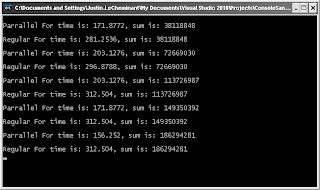
With the advent of C# 4.0 you can now write code to more efficiently use multiple core machines. I will show a trivial example on how to do this. This code reads through a directory and lists all the files. Now while the example itself isn't that complicated I will show some timings and benefits on my Intel duo core 2 machine. Running on even more cores would show an even bigger result. This kind of computing really shines when you're dealing with large amounts of data or very intensive computations. This test sums up 10 million random integers. using System.Threading.Tasks; static void Main( string[] args ) { int[] values = new int[10000000]; Random r = new Random( DateTime.Now.Millisecond ); double sum = 0; for( int i = 0; i < values.Length; i++ ) { values[i] = r.Next( 0, 10 ); } DateTime start = DateTime.Now; DateTime end; // run the test in parallel Parallel.For( 0,...