Posts

Showing posts with the label Drawing

ASP.net MVC dynamically create and return image from Controller

I've found that I have a need to create an image dynamically (or read from a file) and return it directly from a controller. We can do that pretty easily. First add this method to a controller: public class ImageController : Controller { public void Generate() { try { //when we create a pixel we need to make it a random color Random randomGen = new Random(); Bitmap image = new Bitmap( width, height ); // create the graphics drawing tool using ( Graphics gfx = Graphics.FromImage( image ) ) // create a solid brush to draw the image, I'm using random colors using ( SolidBrush brush = new SolidBrush( Color.FromArgb( randomGen.Next( 255 ), randomGen.Next( 255 ), randomGen.Next( 255 ) ) ) ) { gfx.FillRectangle( brush, 0, 0, width, height ); ...

C# Anti Aliasing when drawing

Image
In a previous post I talked about how to set anti-aliasing on text in C#. Now you may find yourself needing to set anti aliasing when drawing shapes. This is very easy to do using the GDI+ graphics object. The trick is to use the SmoothingMode and PixelOffsetMode . Now some quick code protected override void OnPaint( PaintEventArgs e ) { e.Graphics.SmoothingMode = SmoothingMode.AntiAlias; e.Graphics.PixelOffsetMode = PixelOffsetMode.HighQuality; e.Graphics.DrawEllipse( new Pen( new SolidBrush( Color.Red ), 1.0f ), new Rectangle( 5, 5, 200, 200 ) ); e.Graphics.SmoothingMode = SmoothingMode.HighQuality; e.Graphics.PixelOffsetMode = PixelOffsetMode.HighQuality; e.Graphics.DrawEllipse( new Pen( new SolidBrush( Color.Red ), 1.0f ), new Rectangle( 210, 5, 200, 200 ) ); e.Graphics.SmoothingMode = SmoothingMode.HighSpeed; e.Graphics.PixelOffsetMode = PixelOffsetMode.HighQuality; e.Graphics.DrawEllipse( new Pen( new SolidBrush( Color.Red ),...

Antialiasing Text with C#

Image
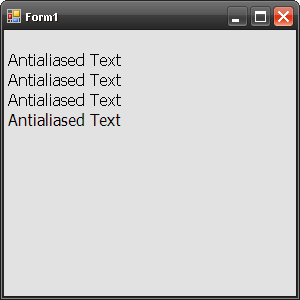
Lately I have found myself having to use anti-aliasing in a lot of our rendering code to improve the output look our images.  To help others here is a snippet of code to anti alias text. protected override void OnPaint( PaintEventArgs e ) {     base.OnPaint( e );     Font font = new Font( "Tahoma", 12.0f, FontStyle.Regular );     e.Graphics.TextRenderingHint = TextRenderingHint.SystemDefault;     TextRenderer.DrawText( e.Graphics, "Antialiased Text", font, new Point( 0, 20 ), Color.Black );      e.Graphics.TextRenderingHint = TextRenderingHint.AntiAlias;      TextRenderer.DrawText( e.Graphics, "Antialiased Text", font, new Point( 0, 40 ), Color.Black );     e.Graphics.TextRenderingHint = TextRenderingHint.AntiAliasGridFit;     TextRenderer.DrawText( e.Graphics, "Antialiased Text", font, new Point( 0, 60 ), Color.Black );     e....