Posts

Showing posts with the label DataBinding

WPF Bind a combobox to an enumeration

I've often found myself needing to bind a combo box to an enumeration I've created. You can do this in WPF but it's a bit complicated. You end up needing to create a static resource. I had mine in a user control. First the enumeration I was using: namespace XmlCoderBI.Enums { /// <summary> /// An enumeration that represents the type of conversion we're doing /// </summary> public enum ConversionType { /// <summary> /// The binary /// </summary> [Description( "Binary" )] Binary = 0, /// <summary> /// The base64 /// </summary> [Description( "Binary" )] Base64 = 1, /// <summary> /// The hexadecimal /// </summary> [Description( "Hexadecimal" )] Hexadecimal = 2, /// <summary> /// The UTF-8 /// </summary> [Description( ...
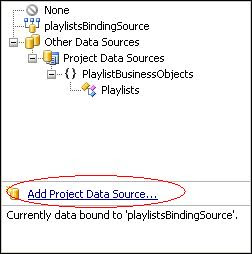
Binding to a DataGridView with a custom collection

Image
Often times I find the need to bind a custom collection to a datagridview in a windows form. .Net makes this easy and with some simple code we can achieve some pretty quick results. First drop a DataGridView onto your form. Click the little white arrow on the top right of the grid and select Choose Data Source. This should bring up wizard that allows you to select what you want to bind to the grid. Select Object and click Next. Now select the class you want to bind too. You can select from all the existing references in your project or add a new one by clicking Add Reference. When you've selected the class to use click the Finish button. Now that you've got the design done let's write some code to show our data in the grid. I have created a custom collection called Playlists that contains a list of Playlist items. My datagrid is bound to this collection and uses its public properties as the values for the columns. public class Playlist { private String _...