Posts

C# create a new process

Once in a while I find myself needing to spawn a process in C#.  The .net framework has some built in functionality to do this.  It's fairly trivial to just spawn a process and let it run.  .NET however allows us many options to customize the look and feel as well as the error output of the spawned process.  The example below simply fires up notepad with a default document.  You can customize this heavily as mentioned and not show windows, etc. You can read all about is on MSDN . // create and setup the process object chartProcess = new Process(); chartProcess.StartInfo.FileName = "notepad.exe"; // this is all optional setup // pass in any command line arguments if desired chartProcess.StartInfo.Arguments = "test.txt"; // chartProcess.StartInfo.UseShellExecute = false; // this determines if we show the actual command or form window chartProcess.StartInfo.CreateNoWindow = false; // this lets us handle an event when the process we start stops chartProcess...
C# Parallel.For

Image
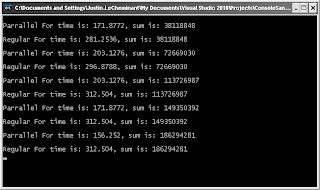
With the advent of C# 4.0 you can now write code to more efficiently use multiple core machines. I will show a trivial example on how to do this. This code reads through a directory and lists all the files. Now while the example itself isn't that complicated I will show some timings and benefits on my Intel duo core 2 machine. Running on even more cores would show an even bigger result. This kind of computing really shines when you're dealing with large amounts of data or very intensive computations. This test sums up 10 million random integers. using System.Threading.Tasks; static void Main( string[] args ) { int[] values = new int[10000000]; Random r = new Random( DateTime.Now.Millisecond ); double sum = 0; for( int i = 0; i < values.Length; i++ ) { values[i] = r.Next( 0, 10 ); } DateTime start = DateTime.Now; DateTime end; // run the test in parallel Parallel.For( 0,...

C# create MD5 hash from a string

A common task when dealing with sensitive data is to create a hash of it. MD5 is used quite often especially when dealing with password, etc. I will leave the discussion of collisions, etc to others and just show a function that will return an array of bytes that is the result of hashing the input string. This function calls for an Encoding object to be passed in since you never know what encoding you will be using. But you could easily hard code the encoding if you know that will never change. using System.Security.Cryptography; /// <summary> /// Hashes the string. /// </summary> /// <param name="valueToHash">The value to hash.</param> /// <param name="textEncoding">The text encoding.</param> /// <returns></returns> private byte[] HashString( String valueToHash, Encoding textEncoding ) { byte[] result; using( MD5 md5 = MD5.Create() ) { byte[] inputBytes = textEncoding.GetBytes( val...

C# get the number of days in a month

Image
Ok this isn't the longest blog post, but it contains a handy little code snippet. Sometimes you find yourself needing to know the number of days in any given month. The code below will get you the last day of the month. I'm using the current month but you could use any month. You just need to know the month and year you're looking for. The magic lies in the DateTime.DaysInMonth method. You pass in the year and month and it returns the number of days in that month. The code below is pretty self explanatory. static void Main( string[] args ) { DateTime now = DateTime.Now; int daysInMonth = DateTime.DaysInMonth( now.Year, now.Month ); String dateFormat = String.Format( "Last day of the month is - {0}/{1}/{2}", now.Month, daysInMonth, now.Year); Console.WriteLine( dateFormat); Console.ReadKey(); } And a brief picture showing the output, obviously I ran this is October 2011.

C# Get the ip address of a host name

Often times you want to find the ip address of a host name. This function will do this for you. It returns the first address. using System.Net; public string GetIPAddress(string sHostName) { IPHostEntry ipEntry = Dns.GetHostByName(sHostName); IPAddress [] addr = ipEntry.AddressList; string sIPAddress = addr[0].ToString(); return sIPAddress; }

C# format date times for different locals (localization and globalization), DateTimeFormatInfo

Image
Working on a project recently I found we were presenting date/time data to a variety of users in various countries. Each country uses it's own date/time formatting. Here in the US it's often MM/dd/yyyy, however in Europe it's often dd/MM/yyyy and in Asia they don't even have the slashes they use special characters that designate year, month, and day. At first we were going to come up with localized versions of all the possible date/time combinations you can display (June 6th, 1977, 6/25/77, etc) but Microsoft has an even better solution already in place. static void Main( string[] args ) { DateTime dt = DateTime.Now; // let's create some different date times for different cultures // JAPANESE CultureInfo culture = new CultureInfo("ja-JP"); DateTimeFormatInfo formatInfo = culture.DateTimeFormat; String time = dt.ToString( formatInfo.FullDateTimePattern, culture ); MessageBox.Show( time );...

Using more complicated PInvoke calls

In my last blog post I covered using a very basic PInvoke call to an unmanaged dll that returned an integer. For basic data types int, char, double, float, etc you don't need to do any manual marshaling. However, especially with the Win32 API you will find yourself needing to use more complicated types. Even getting a string back from an unmanaged dll takes more work, and then we have classes, structs, arrays, etc we need to deal with. Let's look at some unmanaged dll signatures extern "C" { struct { char* NAME, char* ADDRESS, int age } PERSON; void FillByteArray( unsigned char* byteArray, int arrayLength ); const char* GetLastErrorMessage(); void FillAStruct( PERSON* pPerson ); } Now here we have three functions; one fills a byte array, one returns a string, and another modifies a struct we've defined. Nothing complicated on the C++ side but we need to be careful when we start using pinvoke to call these functions...